|
153
|
Allow resizing the elements of the pool/lane/phase when the user resizes it by drag and drop, or, by holding the CTRL key, resize only the frame
with thisform.SwimLane1
	.BeginUpdate
	.AllowDesignHeader = 0
	.AllowLinkControlPoint = 99 && LinkControlPointEnum.exAllowChangeTo Or LinkControlPointEnum.exAllowChangeFrom Or LinkControlPointEnum.exEndControlPoint Or LinkControlPointEnum.exStartControlPoint
	.AllowPoolContentUpdate = 2
	with .Elements
		.Add("Node <b>1",-64,-64)
		.Add("Node <b>2",64,0).Selected = .T.
		.Add("Node <b>3",64,-64)
	endwith
	with .Pools.Add(-100,-100,250,160)
		.Lane(0).Children.Count = 2
		.Lane(1).Children.Count = 2
	endwith
	.Links.Add(thisform.SwimLane1.Elements.Item(1),thisform.SwimLane1.Elements.Item(2),"L1")
	.EndUpdate
endwith
|
|
152
|
Disable resizing the elements of the pool/lane/phase when the user resizes it by drag and drop
with thisform.SwimLane1
	.BeginUpdate
	.AllowDesignHeader = 0
	.AllowLinkControlPoint = 99 && LinkControlPointEnum.exAllowChangeTo Or LinkControlPointEnum.exAllowChangeFrom Or LinkControlPointEnum.exEndControlPoint Or LinkControlPointEnum.exStartControlPoint
	.AllowPoolContentUpdate = 0
	with .Elements
		.Add("Node <b>1",-64,-64)
		.Add("Node <b>2",64,0).Selected = .T.
		.Add("Node <b>3",64,-64)
	endwith
	with .Pools.Add(-100,-100,250,160)
		.Lane(0).Children.Count = 2
		.Lane(1).Children.Count = 2
	endwith
	.Links.Add(thisform.SwimLane1.Elements.Item(1),thisform.SwimLane1.Elements.Item(2),"L1")
	.EndUpdate
endwith
|
|
151
|
Generates a PDF document on a single A0 page with no margins
with thisform.SwimLane1
	.BeginUpdate
	.AllowLinkControlPoint = -1 && 0xffffff80 Or LinkControlPointEnum.exAllowChangeTo Or LinkControlPointEnum.exAllowChangeFrom Or LinkControlPointEnum.exOrthoArrange Or LinkControlPointEnum.exMiddleControlPoint Or LinkControlPointEnum.exControlPoint Or LinkControlPointEnum.exEndControlPoint Or LinkControlPointEnum.exStartControlPoint
	with .Elements
		.Add("Element <sha ;;0>A")
		.Add("Element <sha ;;0>B",164,64)
		.Add("Element <sha ;;0>B",0,132)
	endwith
	with .Links
		.Add(thisform.SwimLane1.Elements.Item(1),thisform.SwimLane1.Elements.Item(2)).CustomPath = "0.5,0.25,0.5,.75"
		.Add(thisform.SwimLane1.Elements.Item(3),thisform.SwimLane1.Elements.Item(2)).CustomPath = "0.5,0.25,0.5,.75"
		with .Add(thisform.SwimLane1.Elements.Item(3),thisform.SwimLane1.Elements.Item(1))
			.ShowLinkType = 3
			.StartPos = 0
			.ArrowSize = 8
			.ArrowColor = RGB(255,255,255)
			.ArrowFrameColor = RGB(0,0,0)
		endwith
	endwith
	.FitToClient
	.EndUpdate
	var_CopyTo = .CopyTo("c:/temp/sample.pdf|33.11 in x 46.81 in|0 0 0 0|single")
endwith
|
|
150
|
Generates a PDF document that scales the content proportionally by 75% using B3 pages (default margins)
with thisform.SwimLane1
	.BeginUpdate
	.AllowLinkControlPoint = -1 && 0xffffff80 Or LinkControlPointEnum.exAllowChangeTo Or LinkControlPointEnum.exAllowChangeFrom Or LinkControlPointEnum.exOrthoArrange Or LinkControlPointEnum.exMiddleControlPoint Or LinkControlPointEnum.exControlPoint Or LinkControlPointEnum.exEndControlPoint Or LinkControlPointEnum.exStartControlPoint
	with .Elements
		.Add("Element <sha ;;0>A")
		.Add("Element <sha ;;0>B",164,64)
		.Add("Element <sha ;;0>B",0,132)
	endwith
	with .Links
		.Add(thisform.SwimLane1.Elements.Item(1),thisform.SwimLane1.Elements.Item(2)).CustomPath = "0.5,0.25,0.5,.75"
		.Add(thisform.SwimLane1.Elements.Item(3),thisform.SwimLane1.Elements.Item(2)).CustomPath = "0.5,0.25,0.5,.75"
		with .Add(thisform.SwimLane1.Elements.Item(3),thisform.SwimLane1.Elements.Item(1))
			.ShowLinkType = 3
			.StartPos = 0
			.ArrowSize = 8
			.ArrowColor = RGB(255,255,255)
			.ArrowFrameColor = RGB(0,0,0)
		endwith
	endwith
	.FitToClient
	.EndUpdate
	var_CopyTo = .CopyTo("c:/temp/sample.pdf|6.93 in x 9.84 in||75%")
endwith
|
|
149
|
Generates a PDF document that fits the content exactly to 3 A4 pages wide by 2 pages tall (default margins)
with thisform.SwimLane1
	.BeginUpdate
	.AllowLinkControlPoint = -1 && 0xffffff80 Or LinkControlPointEnum.exAllowChangeTo Or LinkControlPointEnum.exAllowChangeFrom Or LinkControlPointEnum.exOrthoArrange Or LinkControlPointEnum.exMiddleControlPoint Or LinkControlPointEnum.exControlPoint Or LinkControlPointEnum.exEndControlPoint Or LinkControlPointEnum.exStartControlPoint
	with .Elements
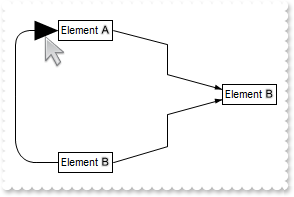
		.Add("Element <sha ;;0>A")
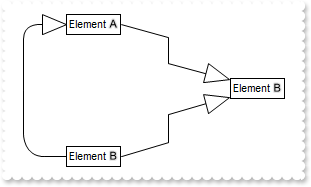
		.Add("Element <sha ;;0>B",164,64)
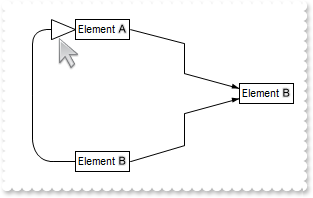
		.Add("Element <sha ;;0>B",0,132)
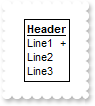
	endwith
	with .Links
		.Add(thisform.SwimLane1.Elements.Item(1),thisform.SwimLane1.Elements.Item(2)).CustomPath = "0.5,0.25,0.5,.75"
		.Add(thisform.SwimLane1.Elements.Item(3),thisform.SwimLane1.Elements.Item(2)).CustomPath = "0.5,0.25,0.5,.75"
		with .Add(thisform.SwimLane1.Elements.Item(3),thisform.SwimLane1.Elements.Item(1))
			.ShowLinkType = 3
			.StartPos = 0
			.ArrowSize = 8
			.ArrowColor = RGB(255,255,255)
			.ArrowFrameColor = RGB(0,0,0)
		endwith
	endwith
	.FitToClient
	.EndUpdate
	var_CopyTo = .CopyTo("c:/temp/sample.pdf|||3 x 2f")
endwith
|
|
148
|
Generates a PDF document that fits the content to 3 A3-landscape pages wide by 2 pages tall (custom margins)
with thisform.SwimLane1
	.BeginUpdate
	.AllowLinkControlPoint = -1 && 0xffffff80 Or LinkControlPointEnum.exAllowChangeTo Or LinkControlPointEnum.exAllowChangeFrom Or LinkControlPointEnum.exOrthoArrange Or LinkControlPointEnum.exMiddleControlPoint Or LinkControlPointEnum.exControlPoint Or LinkControlPointEnum.exEndControlPoint Or LinkControlPointEnum.exStartControlPoint
	with .Elements
		.Add("Element <sha ;;0>A")
		.Add("Element <sha ;;0>B",164,64)
		.Add("Element <sha ;;0>B",0,132)
	endwith
	with .Links
		.Add(thisform.SwimLane1.Elements.Item(1),thisform.SwimLane1.Elements.Item(2)).CustomPath = "0.5,0.25,0.5,.75"
		.Add(thisform.SwimLane1.Elements.Item(3),thisform.SwimLane1.Elements.Item(2)).CustomPath = "0.5,0.25,0.5,.75"
		with .Add(thisform.SwimLane1.Elements.Item(3),thisform.SwimLane1.Elements.Item(1))
			.ShowLinkType = 3
			.StartPos = 0
			.ArrowSize = 8
			.ArrowColor = RGB(255,255,255)
			.ArrowFrameColor = RGB(0,0,0)
		endwith
	endwith
	.FitToClient
	.EndUpdate
	var_CopyTo = .CopyTo("c:/temp/sample.pdf|16.54 in x 11.69 in|5 mm 5 mm 5 mm 5 mm|3 x 2")
endwith
|
|
147
|
Generates a PDF document that fits the content to 2 Letter pages tall, automatically determining the number of pages wide (default margins)
with thisform.SwimLane1
	.BeginUpdate
	.AllowLinkControlPoint = -1 && 0xffffff80 Or LinkControlPointEnum.exAllowChangeTo Or LinkControlPointEnum.exAllowChangeFrom Or LinkControlPointEnum.exOrthoArrange Or LinkControlPointEnum.exMiddleControlPoint Or LinkControlPointEnum.exControlPoint Or LinkControlPointEnum.exEndControlPoint Or LinkControlPointEnum.exStartControlPoint
	with .Elements
		.Add("Element <sha ;;0>A")
		.Add("Element <sha ;;0>B",164,64)
		.Add("Element <sha ;;0>B",0,132)
	endwith
	with .Links
		.Add(thisform.SwimLane1.Elements.Item(1),thisform.SwimLane1.Elements.Item(2)).CustomPath = "0.5,0.25,0.5,.75"
		.Add(thisform.SwimLane1.Elements.Item(3),thisform.SwimLane1.Elements.Item(2)).CustomPath = "0.5,0.25,0.5,.75"
		with .Add(thisform.SwimLane1.Elements.Item(3),thisform.SwimLane1.Elements.Item(1))
			.ShowLinkType = 3
			.StartPos = 0
			.ArrowSize = 8
			.ArrowColor = RGB(255,255,255)
			.ArrowFrameColor = RGB(0,0,0)
		endwith
	endwith
	.FitToClient
	.EndUpdate
	var_CopyTo = .CopyTo("c:/temp/sample.pdf|8.50 in x 11.00 in||x 2")
endwith
|
|
146
|
Generates a PDF document that fits the content to 1 page wide and as many A4 pages tall as required (default margins)
with thisform.SwimLane1
	.BeginUpdate
	.AllowLinkControlPoint = -1 && 0xffffff80 Or LinkControlPointEnum.exAllowChangeTo Or LinkControlPointEnum.exAllowChangeFrom Or LinkControlPointEnum.exOrthoArrange Or LinkControlPointEnum.exMiddleControlPoint Or LinkControlPointEnum.exControlPoint Or LinkControlPointEnum.exEndControlPoint Or LinkControlPointEnum.exStartControlPoint
	with .Elements
		.Add("Element <sha ;;0>A")
		.Add("Element <sha ;;0>B",164,64)
		.Add("Element <sha ;;0>B",0,132)
	endwith
	with .Links
		.Add(thisform.SwimLane1.Elements.Item(1),thisform.SwimLane1.Elements.Item(2)).CustomPath = "0.5,0.25,0.5,.75"
		.Add(thisform.SwimLane1.Elements.Item(3),thisform.SwimLane1.Elements.Item(2)).CustomPath = "0.5,0.25,0.5,.75"
		with .Add(thisform.SwimLane1.Elements.Item(3),thisform.SwimLane1.Elements.Item(1))
			.ShowLinkType = 3
			.StartPos = 0
			.ArrowSize = 8
			.ArrowColor = RGB(255,255,255)
			.ArrowFrameColor = RGB(0,0,0)
		endwith
	endwith
	.FitToClient
	.EndUpdate
	var_CopyTo = .CopyTo("c:/temp/sample.pdf|||1 x")
endwith
|
|
145
|
Generates a PDF document on a single A4 page (default margins)
with thisform.SwimLane1
	.BeginUpdate
	.AllowLinkControlPoint = -1 && 0xffffff80 Or LinkControlPointEnum.exAllowChangeTo Or LinkControlPointEnum.exAllowChangeFrom Or LinkControlPointEnum.exOrthoArrange Or LinkControlPointEnum.exMiddleControlPoint Or LinkControlPointEnum.exControlPoint Or LinkControlPointEnum.exEndControlPoint Or LinkControlPointEnum.exStartControlPoint
	with .Elements
		.Add("Element <sha ;;0>A")
		.Add("Element <sha ;;0>B",164,64)
		.Add("Element <sha ;;0>B",0,132)
	endwith
	with .Links
		.Add(thisform.SwimLane1.Elements.Item(1),thisform.SwimLane1.Elements.Item(2)).CustomPath = "0.5,0.25,0.5,.75"
		.Add(thisform.SwimLane1.Elements.Item(3),thisform.SwimLane1.Elements.Item(2)).CustomPath = "0.5,0.25,0.5,.75"
		with .Add(thisform.SwimLane1.Elements.Item(3),thisform.SwimLane1.Elements.Item(1))
			.ShowLinkType = 3
			.StartPos = 0
			.ArrowSize = 8
			.ArrowColor = RGB(255,255,255)
			.ArrowFrameColor = RGB(0,0,0)
		endwith
	endwith
	.FitToClient
	.EndUpdate
	var_CopyTo = .CopyTo("c:/temp/sample.pdf|||single")
endwith
|
|
144
|
Defines the colors, to display overlapping links
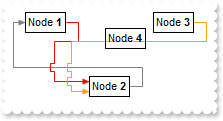
with thisform.SwimLane1
	.BeginUpdate
	.AllowLinkControlPoint = 99 && LinkControlPointEnum.exAllowChangeTo Or LinkControlPointEnum.exAllowChangeFrom Or LinkControlPointEnum.exEndControlPoint Or LinkControlPointEnum.exStartControlPoint
	with .Elements
		.Add("Node <b>1",-64,-64)
		.Add("Node <b>2")
		.Add("Node <b>3",64,-64)
		.Add("Node <b>4",16,-48)
		.Add("Node <b>5",-1024,-48)
		.Add("Node <b>6",16,512)
	endwith
	.Links.Add(thisform.SwimLane1.Elements.Item(1),thisform.SwimLane1.Elements.Item(2),"L1")
	.Links.Add(thisform.SwimLane1.Elements.Item(3),thisform.SwimLane1.Elements.Item(2),"L2")
	.Links.Add(thisform.SwimLane1.Elements.Item(2),thisform.SwimLane1.Elements.Item(1),"L3")
	.ShowLinks = 545 && ShowExtendedLinksEnum.exChangeColorOnOverlap Or ShowExtendedLinksEnum.exShowCrossLinksRect Or ShowExtendedLinksEnum.exShowExtendedLinks
	.OverlapLinksColors = "red,orange"
	.LinksColor = RGB(128,128,128)
	.AxisStyle = -1
	.ShowGridLines = .F.
	.EndUpdate
endwith
|
|
143
|
The exPreventOverlapMixt flag must always be used alongside either the exPreventOverlap or exChangeColorOnOverlap flag. When used with the exPreventOverlap flag, it ensures that links avoid overlapping with elements or obstacles, enabling their paths to include both rectangular and diagonal lines. When combined with the exChangeColorOnOverlap flag, overlapping links alternately adjust their width in addition to changing colors (sample 2)
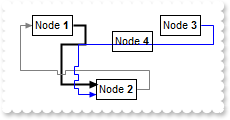
with thisform.SwimLane1
	.BeginUpdate
	.AllowLinkControlPoint = 99 && LinkControlPointEnum.exAllowChangeTo Or LinkControlPointEnum.exAllowChangeFrom Or LinkControlPointEnum.exEndControlPoint Or LinkControlPointEnum.exStartControlPoint
	with .Elements
		.Add("Node <b>1",-64,-64)
		.Add("Node <b>2")
		.Add("Node <b>3",64,-64)
		.Add("Node <b>4",16,-48)
		.Add("Node <b>5",-1024,-48)
		.Add("Node <b>6",16,512)
	endwith
	.Links.Add(thisform.SwimLane1.Elements.Item(1),thisform.SwimLane1.Elements.Item(2),"L1")
	.Links.Add(thisform.SwimLane1.Elements.Item(3),thisform.SwimLane1.Elements.Item(2),"L2")
	.Links.Add(thisform.SwimLane1.Elements.Item(2),thisform.SwimLane1.Elements.Item(1),"L3")
	.ShowLinks = 673 && ShowExtendedLinksEnum.exChangeColorOnOverlap Or ShowExtendedLinksEnum.exPreventOverlapMixt Or ShowExtendedLinksEnum.exShowCrossLinksRect Or ShowExtendedLinksEnum.exShowExtendedLinks
	.LinksColor = RGB(128,128,128)
	.AxisStyle = -1
	.ShowGridLines = .F.
	.EndUpdate
endwith
|
|
142
|
The exChangeColorOnOverlap flag changes the color for links in areas where they overlap with other links, enhancing clarity and distinction between them
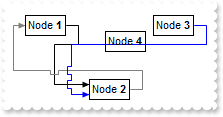
with thisform.SwimLane1
	.BeginUpdate
	.AllowLinkControlPoint = 99 && LinkControlPointEnum.exAllowChangeTo Or LinkControlPointEnum.exAllowChangeFrom Or LinkControlPointEnum.exEndControlPoint Or LinkControlPointEnum.exStartControlPoint
	with .Elements
		.Add("Node <b>1",-64,-64)
		.Add("Node <b>2")
		.Add("Node <b>3",64,-64)
		.Add("Node <b>4",16,-48)
		.Add("Node <b>5",-1024,-48)
		.Add("Node <b>6",16,512)
	endwith
	.Links.Add(thisform.SwimLane1.Elements.Item(1),thisform.SwimLane1.Elements.Item(2),"L1")
	.Links.Add(thisform.SwimLane1.Elements.Item(3),thisform.SwimLane1.Elements.Item(2),"L2")
	.Links.Add(thisform.SwimLane1.Elements.Item(2),thisform.SwimLane1.Elements.Item(1),"L3")
	.ShowLinks = 545 && ShowExtendedLinksEnum.exChangeColorOnOverlap Or ShowExtendedLinksEnum.exShowCrossLinksRect Or ShowExtendedLinksEnum.exShowExtendedLinks
	.LinksColor = RGB(128,128,128)
	.AxisStyle = -1
	.ShowGridLines = .F.
	.EndUpdate
endwith
|
|
141
|
The exPreventOverlapMixt flag must always be used alongside either the exPreventOverlap or exChangeColorOnOverlap flag. When used with the exPreventOverlap flag, it ensures that links avoid overlapping with elements or obstacles, enabling their paths to include both rectangular and diagonal lines. When combined with the exChangeColorOnOverlap flag, overlapping links alternately adjust their width in addition to changing colors (sample 1)
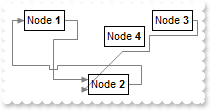
with thisform.SwimLane1
	.BeginUpdate
	.AllowLinkControlPoint = 99 && LinkControlPointEnum.exAllowChangeTo Or LinkControlPointEnum.exAllowChangeFrom Or LinkControlPointEnum.exEndControlPoint Or LinkControlPointEnum.exStartControlPoint
	with .Elements
		.Add("Node <b>1",-64,-64)
		.Add("Node <b>2")
		.Add("Node <b>3",64,-64)
		.Add("Node <b>4",16,-48)
		.Add("Node <b>5",-1024,-48)
		.Add("Node <b>6",16,512)
	endwith
	.Links.Add(thisform.SwimLane1.Elements.Item(1),thisform.SwimLane1.Elements.Item(2),"L1")
	.Links.Add(thisform.SwimLane1.Elements.Item(3),thisform.SwimLane1.Elements.Item(2),"L2")
	.Links.Add(thisform.SwimLane1.Elements.Item(2),thisform.SwimLane1.Elements.Item(1),"L3")
	.ShowLinks = 417 && ShowExtendedLinksEnum.exPreventOverlap Or ShowExtendedLinksEnum.exPreventOverlapMixt Or ShowExtendedLinksEnum.exShowCrossLinksRect Or ShowExtendedLinksEnum.exShowExtendedLinks
	.LinksColor = RGB(128,128,128)
	.AxisStyle = -1
	.ShowGridLines = .F.
	.EndUpdate
endwith
|
|
140
|
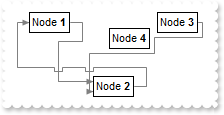
The exPreventOverlap flag adjusts the links to prevent them from overlapping the connected objects. The exPreventOverlap option calculates the path between A and B using the A* (A-star) pathfinding algorithm, which can be a time-consuming operation
with thisform.SwimLane1
	.BeginUpdate
	.AllowLinkControlPoint = 99 && LinkControlPointEnum.exAllowChangeTo Or LinkControlPointEnum.exAllowChangeFrom Or LinkControlPointEnum.exEndControlPoint Or LinkControlPointEnum.exStartControlPoint
	with .Elements
		.Add("Node <b>1",-64,-64)
		.Add("Node <b>2")
		.Add("Node <b>3",64,-64)
		.Add("Node <b>4",16,-48)
		.Add("Node <b>5",-1024,-48)
		.Add("Node <b>6",16,512)
	endwith
	.Links.Add(thisform.SwimLane1.Elements.Item(1),thisform.SwimLane1.Elements.Item(2),"L1")
	.Links.Add(thisform.SwimLane1.Elements.Item(3),thisform.SwimLane1.Elements.Item(2),"L2")
	.Links.Add(thisform.SwimLane1.Elements.Item(2),thisform.SwimLane1.Elements.Item(1),"L3")
	.ShowLinks = 289 && ShowExtendedLinksEnum.exPreventOverlap Or ShowExtendedLinksEnum.exShowCrossLinksRect Or ShowExtendedLinksEnum.exShowExtendedLinks
	.LinksColor = RGB(128,128,128)
	.AxisStyle = -1
	.ShowGridLines = .F.
	.EndUpdate
endwith
|
|
139
|
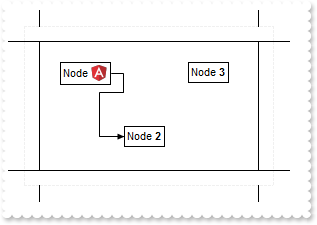
How can I replace or add an icon at runtime
with thisform.SwimLane1
	.BeginUpdate
	var_s = "gAAAABgYACEHgUJFEEAAWhUJCEJEEJggEhMCYEXjUbjkJQECj8gj8hAEjkshYEpk8kf8ClsulsvAExmcvf83js5nU7nkCeEcn8boMaocXosCB9Hn09pkzcEuoL/fE+Ok"
	var_s = var_s + "YB0gB9YhIHrddgVcr9aktZADAD8+P8CgIA=="
	.ReplaceIcon(var_s)
	.ReplaceIcon("C:\images\favicon.ico",0)
	.AllowLinkControlPoint = 99 && LinkControlPointEnum.exAllowChangeTo Or LinkControlPointEnum.exAllowChangeFrom Or LinkControlPointEnum.exEndControlPoint Or LinkControlPointEnum.exStartControlPoint
	with .Elements
		.Add("Node <img>1</img>",-64,-64)
		.Add("Node <b>2")
		.Add("Node <b>3",64,-64)
	endwith
	.Pools.Add(-100,-100,250,160)
	.Links.Add(thisform.SwimLane1.Elements.Item(1),thisform.SwimLane1.Elements.Item(2),"L1")
	.EndUpdate
endwith
|
|
138
|
exActionContextMenuObject, An item from object's context menu is executing. Use the AllowContextMenu property to specify the combination of keys that allows the user to open the object's context menu. Use the ContextMenu property to provide a custom context menu for the objects on the surface. The ActionContextMenu event notifies your application once an action occurs within the object's context menu.
*** LayoutEndChanging event - Notifies your application once the control's layout has been changed. ***
LPARAMETERS Operation
	with thisform.SwimLane1
		DEBUGOUT( "LayoutEndChanging" )
		DEBUGOUT( .FormatABC("value = 18 ? `exActionContextMenuObject` : value",Operation) )
	endwith

*** LayoutStartChanging event - Occurs when the control's layout is about to be changed. ***
LPARAMETERS Operation
	with thisform.SwimLane1
		DEBUGOUT( "LayoutStartChanging" )
		DEBUGOUT( .FormatABC("value = 18 ? `exActionContextMenuObject` : value",Operation) )
	endwith

with thisform.SwimLane1
	.BeginUpdate
	.AllowDesignHeader = 0
	.AllowLinkControlPoint = 99 && LinkControlPointEnum.exAllowChangeTo Or LinkControlPointEnum.exAllowChangeFrom Or LinkControlPointEnum.exEndControlPoint Or LinkControlPointEnum.exStartControlPoint
	with .Elements
		.Add("Node <b>1",-64,-64)
		.Add("Node <b>2").Selected = .T.
		.Add("Node <b>3",64,-64)
	endwith
	with .Pools.Add(-100,-100,250,160)
		.Lane(0).Children.Count = 2
		.Lane(1).Children.Count = 2
	endwith
	.Links.Add(thisform.SwimLane1.Elements.Item(1),thisform.SwimLane1.Elements.Item(2),"L1")
	.EndUpdate
	DEBUGOUT( "Right-Click the pool, element or the link to open its context menu, and change a property of it" )
endwith
|
|
137
|
exContextMenuObject, The object's context menu is running. The user right-clicks an object on the surface, and it's context menu is shown. Use the AllowContextMenu property to specify the combination of keys that allows the user to open the object's context menu. Use the ContextMenu property to provide a custom context menu for the objects on the surface
*** LayoutEndChanging event - Notifies your application once the control's layout has been changed. ***
LPARAMETERS Operation
	with thisform.SwimLane1
		DEBUGOUT( "LayoutEndChanging" )
		DEBUGOUT( .FormatABC("value = 17 ? `exContextMenuObject` : value",Operation) )
	endwith

*** LayoutStartChanging event - Occurs when the control's layout is about to be changed. ***
LPARAMETERS Operation
	with thisform.SwimLane1
		DEBUGOUT( "LayoutStartChanging" )
		DEBUGOUT( .FormatABC("value = 17 ? `exContextMenuObject` : value",Operation) )
	endwith

with thisform.SwimLane1
	.BeginUpdate
	.AllowDesignHeader = 0
	.AllowLinkControlPoint = 99 && LinkControlPointEnum.exAllowChangeTo Or LinkControlPointEnum.exAllowChangeFrom Or LinkControlPointEnum.exEndControlPoint Or LinkControlPointEnum.exStartControlPoint
	with .Elements
		.Add("Node <b>1",-64,-64)
		.Add("Node <b>2").Selected = .T.
		.Add("Node <b>3",64,-64)
	endwith
	with .Pools.Add(-100,-100,250,160)
		.Lane(0).Children.Count = 2
		.Lane(1).Children.Count = 2
	endwith
	.Links.Add(thisform.SwimLane1.Elements.Item(1),thisform.SwimLane1.Elements.Item(2),"L1")
	.EndUpdate
	DEBUGOUT( "Right-Click the pool, element or the link to open its context menu" )
endwith
|
|
136
|
exMoveLane, The user moves/changes the position of the lane of the pool. The AllowMoveLane property specifies the keys combination to allow user to moves/changes the position the lane
*** LayoutEndChanging event - Notifies your application once the control's layout has been changed. ***
LPARAMETERS Operation
	with thisform.SwimLane1
		DEBUGOUT( "LayoutEndChanging" )
		DEBUGOUT( .FormatABC("value = 16 ? `exMoveLane` : value",Operation) )
	endwith

*** LayoutStartChanging event - Occurs when the control's layout is about to be changed. ***
LPARAMETERS Operation
	with thisform.SwimLane1
		DEBUGOUT( "LayoutStartChanging" )
		DEBUGOUT( .FormatABC("value = 16 ? `exMoveLane` : value",Operation) )
	endwith

with thisform.SwimLane1
	.BeginUpdate
	.AllowDesignHeader = 0
	.AllowLinkControlPoint = 99 && LinkControlPointEnum.exAllowChangeTo Or LinkControlPointEnum.exAllowChangeFrom Or LinkControlPointEnum.exEndControlPoint Or LinkControlPointEnum.exStartControlPoint
	with .Elements
		.Add("Node <b>1",-64,-64)
		.Add("Node <b>2").Selected = .T.
		.Add("Node <b>3",64,-64)
	endwith
	with .Pools.Add(-100,-100,250,160)
		.Lane(0).Children.Count = 2
		.Lane(1).Children.Count = 2
	endwith
	.Links.Add(thisform.SwimLane1.Elements.Item(1),thisform.SwimLane1.Elements.Item(2),"L1")
	.EndUpdate
	DEBUGOUT( "Click the lane's header to drag to a new position" )
endwith
|
|
135
|
exResizeLane, The user resizes the lane of the pool. The AllowResizePoolHeader property specifies the keys combination to allow user to resize the header of the pool
*** LayoutEndChanging event - Notifies your application once the control's layout has been changed. ***
LPARAMETERS Operation
	with thisform.SwimLane1
		DEBUGOUT( "LayoutEndChanging" )
		DEBUGOUT( .FormatABC("value = 15 ? `exResizeLane` : value",Operation) )
	endwith

*** LayoutStartChanging event - Occurs when the control's layout is about to be changed. ***
LPARAMETERS Operation
	with thisform.SwimLane1
		DEBUGOUT( "LayoutStartChanging" )
		DEBUGOUT( .FormatABC("value = 15 ? `exResizeLane` : value",Operation) )
	endwith

with thisform.SwimLane1
	.BeginUpdate
	.AllowDesignHeader = 0
	.AllowLinkControlPoint = 99 && LinkControlPointEnum.exAllowChangeTo Or LinkControlPointEnum.exAllowChangeFrom Or LinkControlPointEnum.exEndControlPoint Or LinkControlPointEnum.exStartControlPoint
	with .Elements
		.Add("Node <b>1",-64,-64)
		.Add("Node <b>2").Selected = .T.
		.Add("Node <b>3",64,-64)
	endwith
	with .Pools.Add(-100,-100,250,160)
		.Lane(0).Children.Count = 2
		.Lane(1).Children.Count = 2
	endwith
	.Links.Add(thisform.SwimLane1.Elements.Item(1),thisform.SwimLane1.Elements.Item(2),"L1")
	.EndUpdate
	DEBUGOUT( "Click the pool's header to resize it" )
endwith
|
|
134
|
exResizePoolHeader, the user resizes the header's pool from the surface
*** LayoutEndChanging event - Notifies your application once the control's layout has been changed. ***
LPARAMETERS Operation
	with thisform.SwimLane1
		DEBUGOUT( "LayoutEndChanging" )
		DEBUGOUT( .FormatABC("value = 14 ? `exResizePoolHeader` : value",Operation) )
	endwith

*** LayoutStartChanging event - Occurs when the control's layout is about to be changed. ***
LPARAMETERS Operation
	with thisform.SwimLane1
		DEBUGOUT( "LayoutStartChanging" )
		DEBUGOUT( .FormatABC("value = 14 ? `exResizePoolHeader` : value",Operation) )
	endwith

with thisform.SwimLane1
	.BeginUpdate
	.AllowLinkControlPoint = 99 && LinkControlPointEnum.exAllowChangeTo Or LinkControlPointEnum.exAllowChangeFrom Or LinkControlPointEnum.exEndControlPoint Or LinkControlPointEnum.exStartControlPoint
	with .Elements
		.Add("Node <b>1",-64,-64)
		.Add("Node <b>2").Selected = .T.
		.Add("Node <b>3",64,-64)
	endwith
	.Pools.Add(-100,-100,250,160)
	.Links.Add(thisform.SwimLane1.Elements.Item(1),thisform.SwimLane1.Elements.Item(2),"L1")
	.EndUpdate
	DEBUGOUT( "Click the pool's header to resize it" )
endwith
|
|
133
|
exMovePool, The user moves the pool from the surface. The AllowMovePool property specifies the keys combination to allow user to move the pool
*** LayoutEndChanging event - Notifies your application once the control's layout has been changed. ***
LPARAMETERS Operation
	with thisform.SwimLane1
		DEBUGOUT( "LayoutEndChanging" )
		DEBUGOUT( .FormatABC("value = 13 ? `exMovePool` : value",Operation) )
	endwith

*** LayoutStartChanging event - Occurs when the control's layout is about to be changed. ***
LPARAMETERS Operation
	with thisform.SwimLane1
		DEBUGOUT( "LayoutStartChanging" )
		DEBUGOUT( .FormatABC("value = 13 ? `exMovePool` : value",Operation) )
	endwith

with thisform.SwimLane1
	.BeginUpdate
	.AllowLinkControlPoint = 99 && LinkControlPointEnum.exAllowChangeTo Or LinkControlPointEnum.exAllowChangeFrom Or LinkControlPointEnum.exEndControlPoint Or LinkControlPointEnum.exStartControlPoint
	with .Elements
		.Add("Node <b>1",-64,-64)
		.Add("Node <b>2").Selected = .T.
		.Add("Node <b>3",64,-64)
	endwith
	.Pools.Add(-100,-100,250,160)
	.Links.Add(thisform.SwimLane1.Elements.Item(1),thisform.SwimLane1.Elements.Item(2),"L1")
	.EndUpdate
	DEBUGOUT( "Click a pool and drag to reposition it" )
endwith
|
|
132
|
exResizePool, The user resizes the pool from the surface. The AllowResizePool property specifies the keys combination to allow user to resize the pool
*** LayoutEndChanging event - Notifies your application once the control's layout has been changed. ***
LPARAMETERS Operation
	with thisform.SwimLane1
		DEBUGOUT( "LayoutEndChanging" )
		DEBUGOUT( .FormatABC("value = 12 ? `exResizePool` : value",Operation) )
	endwith

*** LayoutStartChanging event - Occurs when the control's layout is about to be changed. ***
LPARAMETERS Operation
	with thisform.SwimLane1
		DEBUGOUT( "LayoutStartChanging" )
		DEBUGOUT( .FormatABC("value = 12 ? `exResizePool` : value",Operation) )
	endwith

with thisform.SwimLane1
	.BeginUpdate
	.AllowLinkControlPoint = 99 && LinkControlPointEnum.exAllowChangeTo Or LinkControlPointEnum.exAllowChangeFrom Or LinkControlPointEnum.exEndControlPoint Or LinkControlPointEnum.exStartControlPoint
	with .Elements
		.Add("Node <b>1",-64,-64)
		.Add("Node <b>2").Selected = .T.
		.Add("Node <b>3",64,-64)
	endwith
	.Pools.Add(-100,-100,250,160)
	.Links.Add(thisform.SwimLane1.Elements.Item(1),thisform.SwimLane1.Elements.Item(2),"L1")
	.EndUpdate
	DEBUGOUT( "Resize a pool" )
endwith
|
|
131
|
exCreatePool, The user creates pools on the surface. The AllowCreatePool property specifies the keys combination to allow user to create pools on the surface
*** LayoutEndChanging event - Notifies your application once the control's layout has been changed. ***
LPARAMETERS Operation
	with thisform.SwimLane1
		DEBUGOUT( "LayoutEndChanging" )
		DEBUGOUT( .FormatABC("value = 11 ? `exCreatePool` : value",Operation) )
	endwith

*** LayoutStartChanging event - Occurs when the control's layout is about to be changed. ***
LPARAMETERS Operation
	with thisform.SwimLane1
		DEBUGOUT( "LayoutStartChanging" )
		DEBUGOUT( .FormatABC("value = 11 ? `exCreatePool` : value",Operation) )
	endwith

with thisform.SwimLane1
	.BeginUpdate
	.AllowLinkControlPoint = 99 && LinkControlPointEnum.exAllowChangeTo Or LinkControlPointEnum.exAllowChangeFrom Or LinkControlPointEnum.exEndControlPoint Or LinkControlPointEnum.exStartControlPoint
	with .Elements
		.Add("Node <b>1",-64,-64)
		.Add("Node <b>2").Selected = .T.
		.Add("Node <b>3",64,-64)
	endwith
	.Pools.Add(-100,-100,250,160)
	.Links.Add(thisform.SwimLane1.Elements.Item(1),thisform.SwimLane1.Elements.Item(2),"L1")
	.EndUpdate
	DEBUGOUT( "Hold SHIFT, double-click on the surface, and immediately drag to a new position to create a new pool" )
endwith
|
|
130
|
exDesignMode, The user changes the surface's design mode. The exDesignMode operation occurs, when the user selects a new design-mode, from the control's toolbar.
*** LayoutEndChanging event - Notifies your application once the control's layout has been changed. ***
LPARAMETERS Operation
	with thisform.SwimLane1
		DEBUGOUT( "LayoutEndChanging" )
		DEBUGOUT( .FormatABC("value = 10 ? `exDesignMode` : value",Operation) )
	endwith

*** LayoutStartChanging event - Occurs when the control's layout is about to be changed. ***
LPARAMETERS Operation
	with thisform.SwimLane1
		DEBUGOUT( "LayoutStartChanging" )
		DEBUGOUT( .FormatABC("value = 10 ? `exDesignMode` : value",Operation) )
	endwith

with thisform.SwimLane1
	.BeginUpdate
	.AllowLinkControlPoint = 99 && LinkControlPointEnum.exAllowChangeTo Or LinkControlPointEnum.exAllowChangeFrom Or LinkControlPointEnum.exEndControlPoint Or LinkControlPointEnum.exStartControlPoint
	with .Elements
		.Add("Node <b>1",-64,-64)
		.Add("Node <b>2").Selected = .T.
		.Add("Node <b>3",64,-64)
	endwith
	.Pools.Add(-100,-100,250,160)
	.Links.Add(thisform.SwimLane1.Elements.Item(1),thisform.SwimLane1.Elements.Item(2),"L1")
	.EndUpdate
	DEBUGOUT( "Click the Design Menu and select one of the options" )
endwith
|
|
129
|
exUndo, An Undo operation is performed (CTR + Z), exRedo, A Redo operation is performed (CTR + Y). exUndoRedoUpdate, The Undo/Redo queue is updated
*** LayoutEndChanging event - Notifies your application once the control's layout has been changed. ***
LPARAMETERS Operation
	with thisform.SwimLane1
		DEBUGOUT( "LayoutEndChanging" )
		DEBUGOUT( .FormatABC("value case (default:value;32:`exUndoRedoUpdate`;33:`exUndo`;34:`exRedo`)",Operation) )
	endwith

*** LayoutStartChanging event - Occurs when the control's layout is about to be changed. ***
LPARAMETERS Operation
	with thisform.SwimLane1
		DEBUGOUT( "LayoutStartChanging" )
		DEBUGOUT( .FormatABC("value case (default:value;32:`exUndoRedoUpdate`;33:`exUndo`;34:`exRedo`)",Operation) )
	endwith

with thisform.SwimLane1
	.BeginUpdate
	.AllowUndoRedo = .T.
	.AllowLinkControlPoint = 99 && LinkControlPointEnum.exAllowChangeTo Or LinkControlPointEnum.exAllowChangeFrom Or LinkControlPointEnum.exEndControlPoint Or LinkControlPointEnum.exStartControlPoint
	with .Elements
		.Add("Node <b>1",-64,-64)
		.Add("Node <b>2")
		.Add("Node <b>3",64,-64)
	endwith
	.Pools.Add(-100,-100,250,160)
	.Links.Add(thisform.SwimLane1.Elements.Item(1),thisform.SwimLane1.Elements.Item(2),"L1")
	.EndUpdate
	DEBUGOUT( "Press CTRL+Z to Undo, CTRL+Y to Redo" )
endwith
|
|
128
|
exLinkObjects, the user creates an element on the surface. The AllowLinkObjects property specifies the keys combination to allow user to link elements on the surface
*** LayoutEndChanging event - Notifies your application once the control's layout has been changed. ***
LPARAMETERS Operation
	with thisform.SwimLane1
		DEBUGOUT( "LayoutEndChanging" )
		DEBUGOUT( .FormatABC("value = 9 ? `exLinkObjects` : value",Operation) )
	endwith

*** LayoutStartChanging event - Occurs when the control's layout is about to be changed. ***
LPARAMETERS Operation
	with thisform.SwimLane1
		DEBUGOUT( "LayoutStartChanging" )
		DEBUGOUT( .FormatABC("value = 9 ? `exLinkObjects` : value",Operation) )
	endwith

with thisform.SwimLane1
	.BeginUpdate
	with .Elements
		.Add("Node <b>1",-64,-64)
		.Add("Node <b>2")
		.Add("Node <b>3",64,-64)
	endwith
	.EndUpdate
	DEBUGOUT( "Hold SHIFT, click an element, and drag to another element to create a link between them" )
endwith
|
|
127
|
exEditObject, the user edits the element's caption
*** Click event - Occurs when the user presses and then releases the left mouse button over the control. ***
LPARAMETERS nop
	*** ElementFromPoint(-1,-1).Edit(0)

*** LayoutEndChanging event - Notifies your application once the control's layout has been changed. ***
LPARAMETERS Operation
	with thisform.SwimLane1
		DEBUGOUT( "LayoutEndChanging" )
		DEBUGOUT( .FormatABC("value = 8 ? `exEditObject` : value",Operation) )
	endwith

*** LayoutStartChanging event - Occurs when the control's layout is about to be changed. ***
LPARAMETERS Operation
	with thisform.SwimLane1
		DEBUGOUT( "LayoutStartChanging" )
		DEBUGOUT( .FormatABC("value = 8 ? `exEditObject` : value",Operation) )
	endwith

with thisform.SwimLane1
	.BeginUpdate
	.AllowLinkControlPoint = 99 && LinkControlPointEnum.exAllowChangeTo Or LinkControlPointEnum.exAllowChangeFrom Or LinkControlPointEnum.exEndControlPoint Or LinkControlPointEnum.exStartControlPoint
	with .Elements
		.Add("Node <b>1",-64,-64)
		.Add("Node <b>2")
		.Add("Node <b>3",64,-64)
	endwith
	.Pools.Add(-100,-100,250,160)
	.Links.Add(thisform.SwimLane1.Elements.Item(1),thisform.SwimLane1.Elements.Item(2),"L1")
	.EndUpdate
	DEBUGOUT( "Click an element to edit its caption" )
endwith
|
|
126
|
exCreateObject, the user creates an element on the surface. The AllowCreateObject property specifies the keys combination to allow user to create elements on the surface
*** LayoutEndChanging event - Notifies your application once the control's layout has been changed. ***
LPARAMETERS Operation
	with thisform.SwimLane1
		DEBUGOUT( "LayoutEndChanging" )
		DEBUGOUT( .FormatABC("value = 7 ? `exCreateObject` : value",Operation) )
	endwith

*** LayoutStartChanging event - Occurs when the control's layout is about to be changed. ***
LPARAMETERS Operation
	with thisform.SwimLane1
		DEBUGOUT( "LayoutStartChanging" )
		DEBUGOUT( .FormatABC("value = 7 ? `exCreateObject` : value",Operation) )
	endwith

with thisform.SwimLane1
	.BeginUpdate
	.AllowLinkControlPoint = 99 && LinkControlPointEnum.exAllowChangeTo Or LinkControlPointEnum.exAllowChangeFrom Or LinkControlPointEnum.exEndControlPoint Or LinkControlPointEnum.exStartControlPoint
	with .Elements
		.Add("Node <b>1",-64,-64)
		.Add("Node <b>2").Selected = .T.
		.Add("Node <b>3",64,-64)
	endwith
	.Pools.Add(-100,-100,250,160)
	.Links.Add(thisform.SwimLane1.Elements.Item(1),thisform.SwimLane1.Elements.Item(2),"L1")
	.EndUpdate
	DEBUGOUT( "Double-click on the surface and immediately drag to a new position to create an element" )
endwith
|
|
125
|
exSelectNothing, the user clicks an empty zone of the surface. The AllowSelectNothing property specifies the keys combination to allow user to select nothing on the surface
*** LayoutEndChanging event - Notifies your application once the control's layout has been changed. ***
LPARAMETERS Operation
	with thisform.SwimLane1
		DEBUGOUT( "LayoutEndChanging" )
		DEBUGOUT( .FormatABC("value = 6 ? `exSelectNothing` : value",Operation) )
	endwith

*** LayoutStartChanging event - Occurs when the control's layout is about to be changed. ***
LPARAMETERS Operation
	with thisform.SwimLane1
		DEBUGOUT( "LayoutStartChanging" )
		DEBUGOUT( .FormatABC("value = 6 ? `exSelectNothing` : value",Operation) )
	endwith

with thisform.SwimLane1
	.BeginUpdate
	.AllowSelectNothing = .T.
	.AllowLinkControlPoint = 99 && LinkControlPointEnum.exAllowChangeTo Or LinkControlPointEnum.exAllowChangeFrom Or LinkControlPointEnum.exEndControlPoint Or LinkControlPointEnum.exStartControlPoint
	with .Elements
		.Add("Node <b>1",-64,-64)
		.Add("Node <b>2").Selected = .T.
		.Add("Node <b>3",64,-64)
	endwith
	.Pools.Add(-100,-100,250,160)
	.Links.Add(thisform.SwimLane1.Elements.Item(1),thisform.SwimLane1.Elements.Item(2),"L1")
	.EndUpdate
	DEBUGOUT( "Select an element, and then click outside to select nothing" )
endwith
|
|
124
|
exSelectElement, the user clicks the object to get it selected. The AllowSelectObject property specifies the keys combination to allow user to select the object
*** LayoutEndChanging event - Notifies your application once the control's layout has been changed. ***
LPARAMETERS Operation
	with thisform.SwimLane1
		DEBUGOUT( "LayoutEndChanging" )
		DEBUGOUT( .FormatABC("value = 5 ? `exSelectElement` : value",Operation) )
	endwith

*** LayoutStartChanging event - Occurs when the control's layout is about to be changed. ***
LPARAMETERS Operation
	with thisform.SwimLane1
		DEBUGOUT( "LayoutStartChanging" )
		DEBUGOUT( .FormatABC("value = 5 ? `exSelectElement` : value",Operation) )
	endwith

with thisform.SwimLane1
	.BeginUpdate
	.AllowLinkControlPoint = 99 && LinkControlPointEnum.exAllowChangeTo Or LinkControlPointEnum.exAllowChangeFrom Or LinkControlPointEnum.exEndControlPoint Or LinkControlPointEnum.exStartControlPoint
	with .Elements
		.Add("Node <b>1",-64,-64)
		.Add("Node <b>2")
		.Add("Node <b>3",64,-64)
	endwith
	.Pools.Add(-100,-100,250,160)
	.Links.Add(thisform.SwimLane1.Elements.Item(1),thisform.SwimLane1.Elements.Item(2),"L1")
	.EndUpdate
	var_s = "Hold ALT and click, then drag to select elements within the drawn rectangle. Click an element to select it. CTRL + CLick to unse"
	var_s = var_s + "lect it"
	DEBUGOUT( var_s )
endwith
|
|
123
|
exMoveElement, the user moves the object. The AllowMoveObject property specifies the keys combination to allow user to move the object
*** LayoutEndChanging event - Notifies your application once the control's layout has been changed. ***
LPARAMETERS Operation
	with thisform.SwimLane1
		DEBUGOUT( "LayoutEndChanging" )
		DEBUGOUT( .FormatABC("value = 4 ? `exMoveElement` : value",Operation) )
	endwith

*** LayoutStartChanging event - Occurs when the control's layout is about to be changed. ***
LPARAMETERS Operation
	with thisform.SwimLane1
		DEBUGOUT( "LayoutStartChanging" )
		DEBUGOUT( .FormatABC("value = 4 ? `exMoveElement` : value",Operation) )
	endwith

with thisform.SwimLane1
	.BeginUpdate
	.AllowLinkControlPoint = 99 && LinkControlPointEnum.exAllowChangeTo Or LinkControlPointEnum.exAllowChangeFrom Or LinkControlPointEnum.exEndControlPoint Or LinkControlPointEnum.exStartControlPoint
	with .Elements
		.Add("Node <b>1",-64,-64)
		.Add("Node <b>2")
		.Add("Node <b>3",64,-64)
	endwith
	.Pools.Add(-100,-100,250,160)
	.Links.Add(thisform.SwimLane1.Elements.Item(1),thisform.SwimLane1.Elements.Item(2),"L1")
	.EndUpdate
	DEBUGOUT( "Move an element" )
endwith
|
|
122
|
exResizeElement, the user resizes the object. The AllowResizeObject property specifies the keys combination to allow user to resize the object
*** LayoutEndChanging event - Notifies your application once the control's layout has been changed. ***
LPARAMETERS Operation
	with thisform.SwimLane1
		DEBUGOUT( "LayoutEndChanging" )
		DEBUGOUT( .FormatABC("value = 3 ? `exResizeElement` : value",Operation) )
	endwith

*** LayoutStartChanging event - Occurs when the control's layout is about to be changed. ***
LPARAMETERS Operation
	with thisform.SwimLane1
		DEBUGOUT( "LayoutStartChanging" )
		DEBUGOUT( .FormatABC("value = 3 ? `exResizeElement` : value",Operation) )
	endwith

with thisform.SwimLane1
	.BeginUpdate
	.AllowLinkControlPoint = 99 && LinkControlPointEnum.exAllowChangeTo Or LinkControlPointEnum.exAllowChangeFrom Or LinkControlPointEnum.exEndControlPoint Or LinkControlPointEnum.exStartControlPoint
	with .Elements
		.Add("Node <b>1",-64,-64).AutoSize = .F.
		.Add("Node <b>2").AutoSize = .F.
		.Add("Node <b>3",64,-64).AutoSize = .F.
	endwith
	.Pools.Add(-100,-100,250,160)
	.Links.Add(thisform.SwimLane1.Elements.Item(1),thisform.SwimLane1.Elements.Item(2),"L1")
	.EndUpdate
	DEBUGOUT( "Resize an element" )
endwith
|
|
121
|
exSurfaceHome, the user clicks the Home button on the control's toolbar, so the surface is restored to original position. The Home method has the same effect
*** LayoutEndChanging event - Notifies your application once the control's layout has been changed. ***
LPARAMETERS Operation
	with thisform.SwimLane1
		DEBUGOUT( "LayoutEndChanging" )
		DEBUGOUT( .FormatABC("value = 2 ? `exSurfaceHome` : value",Operation) )
	endwith

*** LayoutStartChanging event - Occurs when the control's layout is about to be changed. ***
LPARAMETERS Operation
	with thisform.SwimLane1
		DEBUGOUT( "LayoutStartChanging" )
		DEBUGOUT( .FormatABC("value = 2 ? `exSurfaceHome` : value",Operation) )
	endwith

with thisform.SwimLane1
	.BeginUpdate
	.AllowLinkControlPoint = 99 && LinkControlPointEnum.exAllowChangeTo Or LinkControlPointEnum.exAllowChangeFrom Or LinkControlPointEnum.exEndControlPoint Or LinkControlPointEnum.exStartControlPoint
	with .Elements
		.Add("Node <b>1",-64,-64)
		.Add("Node <b>2")
		.Add("Node <b>3",64,-64)
	endwith
	.Pools.Add(-100,-100,250,160)
	.Links.Add(thisform.SwimLane1.Elements.Item(1),thisform.SwimLane1.Elements.Item(2),"L1")
	.EndUpdate
	DEBUGOUT( "Click the Home button" )
endwith
|
|
120
|
exSurfaceZoom, the user magnifies or shrinks the surface. The AllowZoomSurface property specifies the keys combination to allow user to zoom the surface
*** LayoutEndChanging event - Notifies your application once the control's layout has been changed. ***
LPARAMETERS Operation
	with thisform.SwimLane1
		DEBUGOUT( "LayoutEndChanging" )
		DEBUGOUT( .FormatABC("value = 1 ? `exSurfaceZoom` : value",Operation) )
	endwith

*** LayoutStartChanging event - Occurs when the control's layout is about to be changed. ***
LPARAMETERS Operation
	with thisform.SwimLane1
		DEBUGOUT( "LayoutStartChanging" )
		DEBUGOUT( .FormatABC("value = 1 ? `exSurfaceZoom` : value",Operation) )
	endwith

with thisform.SwimLane1
	.BeginUpdate
	.AllowLinkControlPoint = 99 && LinkControlPointEnum.exAllowChangeTo Or LinkControlPointEnum.exAllowChangeFrom Or LinkControlPointEnum.exEndControlPoint Or LinkControlPointEnum.exStartControlPoint
	with .Elements
		.Add("Node <b>1",-64,-64)
		.Add("Node <b>2")
		.Add("Node <b>3",64,-64)
	endwith
	.Pools.Add(-100,-100,250,160)
	.Links.Add(thisform.SwimLane1.Elements.Item(1),thisform.SwimLane1.Elements.Item(2),"L1")
	.EndUpdate
	DEBUGOUT( "Click and drag the surface to reposition it" )
endwith
|
|
119
|
exSurfaceMove, the user scrolls or moves the surface. The AllowMoveSurface property specifies the keys combination to allow user to move / scroll the surface
*** LayoutEndChanging event - Notifies your application once the control's layout has been changed. ***
LPARAMETERS Operation
	with thisform.SwimLane1
		DEBUGOUT( "LayoutEndChanging" )
		DEBUGOUT( .FormatABC("value = 0 ? `exSurfaceMove` : value",Operation) )
	endwith

*** LayoutStartChanging event - Occurs when the control's layout is about to be changed. ***
LPARAMETERS Operation
	with thisform.SwimLane1
		DEBUGOUT( "LayoutStartChanging" )
		DEBUGOUT( .FormatABC("value = 0 ? `exSurfaceMove` : value",Operation) )
	endwith

with thisform.SwimLane1
	.BeginUpdate
	.AllowLinkControlPoint = 99 && LinkControlPointEnum.exAllowChangeTo Or LinkControlPointEnum.exAllowChangeFrom Or LinkControlPointEnum.exEndControlPoint Or LinkControlPointEnum.exStartControlPoint
	with .Elements
		.Add("Node <b>1",-64,-64)
		.Add("Node <b>2")
		.Add("Node <b>3",64,-64)
	endwith
	.Pools.Add(-100,-100,250,160)
	.Links.Add(thisform.SwimLane1.Elements.Item(1),thisform.SwimLane1.Elements.Item(2),"L1")
	.EndUpdate
	DEBUGOUT( "Click and drag the surface to reposition it" )
endwith
|
|
118
|
FormatABC method formats the A,B,C values based on the giving expression and returns the result
with thisform.SwimLane1
	DEBUGOUT( .FormatABC("value format ``",1000) )
endwith
|
|
117
|
FreezeEvents(Freeze) method prevents firing any event. For instance, FreezeEvents(True) freezes the control's events, no no event is fired, until the FreezeEvents(False) is called
*** Event event - Notifies the application once the control fires an event. ***
LPARAMETERS EventID
	with thisform.SwimLane1
		DEBUGOUT( .EventParam(-2) )
	endwith

with thisform.SwimLane1
	.FreezeEvents(.T.)
	DEBUGOUT( "No event is fired after FreezeEvents(True) call" )
	.BeginUpdate
	.AllowLinkControlPoint = 3 && LinkControlPointEnum.exEndControlPoint Or LinkControlPointEnum.exStartControlPoint
	with .Elements
		.Add("Node <b>1",-64,-64)
		.Add("Node <b>2")
	endwith
	.Pools.Add(-100,-100,250,160)
	.Links.Add(thisform.SwimLane1.Elements.Item(1),thisform.SwimLane1.Elements.Item(2),"L1")
	.EndUpdate
endwith
|
|
116
|
The exAllowChangeFrom(0x20)/exAllowChangeTo(0x40) flag of LinkControlPointEnum type allows the user to adjust the link's from/to element by dragging and dropping the start control point (requires the exStartControlPoint/exEndControlPoint flag)
*** LayoutEndChanging event - Notifies your application once the control's layout has been changed. ***
LPARAMETERS Operation
	with thisform.SwimLane1
		DEBUGOUT( "LayoutEndChanging" )
		DEBUGOUT( Operation )
		DEBUGOUT( .FocusLink.ID )
	endwith

*** LayoutStartChanging event - Occurs when the control's layout is about to be changed. ***
LPARAMETERS Operation
	with thisform.SwimLane1
		DEBUGOUT( "LayoutStartChanging" )
		DEBUGOUT( Operation )
		DEBUGOUT( .FocusLink.ID )
	endwith

with thisform.SwimLane1
	.BeginUpdate
	.AllowLinkControlPoint = 99 && LinkControlPointEnum.exAllowChangeTo Or LinkControlPointEnum.exAllowChangeFrom Or LinkControlPointEnum.exEndControlPoint Or LinkControlPointEnum.exStartControlPoint
	with .Elements
		.Add("Node <b>1",-64,-64)
		.Add("Node <b>2")
		.Add("Node <b>3",64,-64)
	endwith
	.Pools.Add(-100,-100,250,160)
	.Links.Add(thisform.SwimLane1.Elements.Item(1),thisform.SwimLane1.Elements.Item(2),"L1")
	.FocusLink = "L1"
	.EndUpdate
endwith
|
|
115
|
The LayoutStartChanging(exFocusLink)/LayoutEndChanging(exFocusLink) event notifies your application when the user focuses on a new link
*** LayoutEndChanging event - Notifies your application once the control's layout has been changed. ***
LPARAMETERS Operation
	with thisform.SwimLane1
		DEBUGOUT( "LayoutEndChanging" )
		DEBUGOUT( Operation )
		DEBUGOUT( .FocusLink )
	endwith

*** LayoutStartChanging event - Occurs when the control's layout is about to be changed. ***
LPARAMETERS Operation
	with thisform.SwimLane1
		DEBUGOUT( "LayoutStartChanging" )
		DEBUGOUT( Operation )
		DEBUGOUT( .FocusLink )
	endwith

with thisform.SwimLane1
	.BeginUpdate
	.AllowLinkControlPoint = 3 && LinkControlPointEnum.exEndControlPoint Or LinkControlPointEnum.exStartControlPoint
	with .Elements
		.Add("Node <b>1",-64,-64)
		.Add("Node <b>2")
	endwith
	.Pools.Add(-100,-100,250,160)
	.Links.Add(thisform.SwimLane1.Elements.Item(1),thisform.SwimLane1.Elements.Item(2),"L1")
	.EndUpdate
endwith
|
|
114
|
Focus a link
*** LayoutEndChanging event - Notifies your application once the control's layout has been changed. ***
LPARAMETERS Operation
	with thisform.SwimLane1
		DEBUGOUT( "LayoutEndChanging" )
		DEBUGOUT( Operation )
	endwith

*** LayoutStartChanging event - Occurs when the control's layout is about to be changed. ***
LPARAMETERS Operation
	with thisform.SwimLane1
		DEBUGOUT( "LayoutStartChanging" )
		DEBUGOUT( Operation )
	endwith

with thisform.SwimLane1
	.BeginUpdate
	.AllowLinkControlPoint = 3 && LinkControlPointEnum.exEndControlPoint Or LinkControlPointEnum.exStartControlPoint
	with .Elements
		.Add("Node <b>1",-64,-64)
		.Add("Node <b>2")
	endwith
	.Pools.Add(-100,-100,250,160)
	.Links.Add(thisform.SwimLane1.Elements.Item(1),thisform.SwimLane1.Elements.Item(2),"L1")
	.FocusLink = "L1"
	.EndUpdate
endwith
|
|
113
|
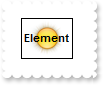
The caption is displayed on the back, so the picture overrides it. How can I place the caption on the foreground
with thisform.SwimLane1
	.BeginUpdate
	.DrawPartsOrder = "extracaption,extrapicture,picture,check,caption,client"
	.Object.HTMLPicture("pic1") = "c:\exontrol\images\sun.png"
	with .Elements.Add("<b>Element")
		.PicturesAlign = 17
		.CaptionAlign = 17
		.Pictures = "pic1"
	endwith
	.EndUpdate
endwith
|
|
112
|
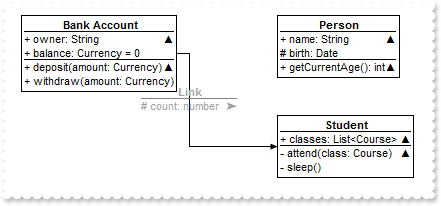
Expandable-caption
*** AnchorClick event - Occurs when an anchor element is clicked. ***
LPARAMETERS AnchorID, Options
	with thisform.SwimLane1
		DEBUGOUT( AnchorID )
	endwith

with thisform.SwimLane1
	var_s = "<solidline> <c><b>Bank Account</b></solidline><br>+ owner: String <r><a 1;e64=gA8ABzABvABsABpABkg8JABuABlAAgAA4AAwisXjMYH0TAECMY"
	var_s = var_s + "AjsCMwAM4AkMGhEGOUei0Yl8bkQAOAAlsGmsSlp0h0SgkCF8DgsNhUMhEKiESkYAoMlk8phssmcCltLMNTAFOlFDlc2l0amMxjomAAjAA5AA2tMaHcfplZk1blVDqtuo"
	var_s = var_s + "NXjoAAEBA=>▲</a><br><solidline>+ balance: Currency = 0</solidline><br>+ deposit(amount: Currency)<r><a 2;e64=gA8ABjAA+AECM"
	var_s = var_s + "wAM8DABvABshoAOQAEAAHAAGEWjEajMGNoAMoAOgANERMgAOcHAAvAEJhcEh0Qh0Tg0CmkqMMFlUuhkxiMTisXjNCjk6EwAEYAHIAG1MjY7lUsnkwh8/nUClk5gwAAEB"
	var_s = var_s + "A==>▲</a><br>+ withdraw(amount: Currency)"
	with .Elements.Add(var_s)
		.ID = "Account"
		.X = -256
		.Y = -164
		.CaptionSingleLine = 1
		.CaptionAlign = 4 && 0x4
	endwith
	var_s1 = "<solidline> <c><b>Person</b></solidline><br>+ name: String <r><a 1;e64=gA8ABzABvABsABpABkg8JABuABlAAgAA4AAwisXjMYH0TAECMYAjsCMwA"
	var_s1 = var_s1 + "M4AkMGhEGOUei0Yl8bkQAOAAlsGmsSlp0h0SgkCF8DgsNhUMhEKiESkYAoMlk8phssmcCltLMNTAFOlFDlc2l0amMxjomAAjAA5AA2tMaHcfplZk1blVDqtuoNXjoAAE"
	var_s1 = var_s1 + "BA=>▲</a><br><solidline># birth: Date</solidline><br>+ getCurrentAge(): int<r><a 2;e64=gA8ABjAA+AECMwAM8DABvABshoAOQAEAAHA"
	var_s1 = var_s1 + "AGEWjEajMGNoAMoAOgANERMgAOcHAAvAEJhcEh0Qh0Tg0CmkqMMFlUuhkxiMTisXjNCjk6EwAEYAHIAG1MjY7lUsnkwh8/nUClk5gwAAEBA==>▲</a>"
	with .Elements.Add(var_s1)
		.ID = "Person"
		.Y = -164
		.CaptionSingleLine = 1
	endwith
	var_s2 = "<solidline> <c><b>Student</b></solidline><br><solidline>+ classes: List<Course> <r><a 1;e64=gA8ABzABvABsABpABkg8JABuABlAA+AAgAEC"
	var_s2 = var_s2 + "McTi4AMwAM4AjMGhEGOUVAA4AAwk8plcqihwAElg0wiUlOkOiUEgQvgcFhsKhkIhUQiUUnccj0gn0jmMagUlowAMNOpEfkMNkkmlEqrctjQmAAjAA5AA2sssHcbnkdq1"
	var_s2 = var_s2 + "Ln1QtVSjQAAEBA==>▲</a></solidline><br>- attend(class: Course)<r><a 2;e64=gA8ABjAA+AECMwAM8DABvABshoAOQAEAAHAAGEWjEajMGNoAM"
	var_s2 = var_s2 + "oAOgANERMgAOcHAAvAEJhcEh0Qh0Tg0CmkqMMFlUuhkxiMTisXjNCjk6EwAEYAHIAG1MjY7lUsnkwh8/nUClk5gwAAEBA==>▲</a><br>- sleep()"
	with .Elements.Add(var_s2)
		.ID = "Student"
		.Y = -64
		.CaptionSingleLine = 1
	endwith
	with .Links.Add(thisform.SwimLane1.Elements.Item("Account"),thisform.SwimLane1.Elements.Item("Student"))
		.Caption = "<fgcolor A0A0A0><solidline 808080> <c><b>Link</b></solidline><br># count: number <r><a ;exp=12992>➤</a>"
	endwith
endwith
|
|
111
|
Expandable-caption
with thisform.SwimLane1
	with .Elements.Add("<solidline><b>Header</b></solidline><br>Line1<r><a ;exp=show lines>+</a><br>Line2<br>Line3")
		.CaptionSingleLine = 1
	endwith
endwith
|
|
110
|
Draws a frame arround the link's arrow
with thisform.SwimLane1
	.BeginUpdate
	.AllowLinkControlPoint = -1 && 0xffffff80 Or LinkControlPointEnum.exAllowChangeTo Or LinkControlPointEnum.exAllowChangeFrom Or LinkControlPointEnum.exOrthoArrange Or LinkControlPointEnum.exMiddleControlPoint Or LinkControlPointEnum.exControlPoint Or LinkControlPointEnum.exEndControlPoint Or LinkControlPointEnum.exStartControlPoint
	with .Elements
		.Add("Element <sha ;;0>A")
		.Add("Element <sha ;;0>B",164,64)
		.Add("Element <sha ;;0>B",0,132)
	endwith
	with .Links
		.Add(thisform.SwimLane1.Elements.Item(1),thisform.SwimLane1.Elements.Item(2)).CustomPath = "0.5,0.25,0.5,.75"
		.Add(thisform.SwimLane1.Elements.Item(3),thisform.SwimLane1.Elements.Item(2)).CustomPath = "0.5,0.25,0.5,.75"
		with .Add(thisform.SwimLane1.Elements.Item(3),thisform.SwimLane1.Elements.Item(1))
			.ShowLinkType = 3
			.StartPos = 0
			.ArrowSize = 8
			.ArrowColor = RGB(255,255,255)
			.ArrowFrameColor = RGB(0,0,0)
		endwith
	endwith
	.FitToClient
	.EndUpdate
endwith
|
|
109
|
Draws a frame arround the arrow for all links
with thisform.SwimLane1
	.BeginUpdate
	.AllowLinkControlPoint = -1 && 0xffffff80 Or LinkControlPointEnum.exAllowChangeTo Or LinkControlPointEnum.exAllowChangeFrom Or LinkControlPointEnum.exOrthoArrange Or LinkControlPointEnum.exMiddleControlPoint Or LinkControlPointEnum.exControlPoint Or LinkControlPointEnum.exEndControlPoint Or LinkControlPointEnum.exStartControlPoint
	.LinksArrowSize = 8
	.LinksArrowColor = RGB(255,255,255)
	.LinksArrowFrameColor = RGB(0,0,0)
	with .Elements
		.Add("Element <sha ;;0>A")
		.Add("Element <sha ;;0>B",164,64)
		.Add("Element <sha ;;0>B",0,132)
	endwith
	with .Links
		.Add(thisform.SwimLane1.Elements.Item(1),thisform.SwimLane1.Elements.Item(2)).CustomPath = "0.5,0.25,0.5,.75"
		.Add(thisform.SwimLane1.Elements.Item(3),thisform.SwimLane1.Elements.Item(2)).CustomPath = "0.5,0.25,0.5,.75"
		with .Add(thisform.SwimLane1.Elements.Item(3),thisform.SwimLane1.Elements.Item(1))
			.ShowLinkType = 3
			.StartPos = 0
		endwith
	endwith
	.FitToClient
	.EndUpdate
endwith
|
|
108
|
Change the size to display the arrow of the link
with thisform.SwimLane1
	.BeginUpdate
	.AllowLinkControlPoint = -1 && 0xffffff80 Or LinkControlPointEnum.exAllowChangeTo Or LinkControlPointEnum.exAllowChangeFrom Or LinkControlPointEnum.exOrthoArrange Or LinkControlPointEnum.exMiddleControlPoint Or LinkControlPointEnum.exControlPoint Or LinkControlPointEnum.exEndControlPoint Or LinkControlPointEnum.exStartControlPoint
	with .Elements
		.Add("Element <sha ;;0>A")
		.Add("Element <sha ;;0>B",164,64)
		.Add("Element <sha ;;0>B",0,132)
	endwith
	with .Links
		.Add(thisform.SwimLane1.Elements.Item(1),thisform.SwimLane1.Elements.Item(2)).CustomPath = "0.5,0.25,0.5,.75"
		.Add(thisform.SwimLane1.Elements.Item(3),thisform.SwimLane1.Elements.Item(2)).CustomPath = "0.5,0.25,0.5,.75"
		with .Add(thisform.SwimLane1.Elements.Item(3),thisform.SwimLane1.Elements.Item(1))
			.ShowLinkType = 3
			.StartPos = 0
			.ArrowSize = 8
		endwith
	endwith
	.FitToClient
	.EndUpdate
endwith
|
|
107
|
Change the size to display the arrows for all links
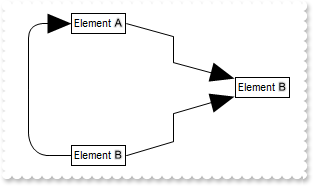
with thisform.SwimLane1
	.BeginUpdate
	.AllowLinkControlPoint = -1 && 0xffffff80 Or LinkControlPointEnum.exAllowChangeTo Or LinkControlPointEnum.exAllowChangeFrom Or LinkControlPointEnum.exOrthoArrange Or LinkControlPointEnum.exMiddleControlPoint Or LinkControlPointEnum.exControlPoint Or LinkControlPointEnum.exEndControlPoint Or LinkControlPointEnum.exStartControlPoint
	.LinksArrowSize = 8
	with .Elements
		.Add("Element <sha ;;0>A")
		.Add("Element <sha ;;0>B",164,64)
		.Add("Element <sha ;;0>B",0,132)
	endwith
	with .Links
		.Add(thisform.SwimLane1.Elements.Item(1),thisform.SwimLane1.Elements.Item(2)).CustomPath = "0.5,0.25,0.5,.75"
		.Add(thisform.SwimLane1.Elements.Item(3),thisform.SwimLane1.Elements.Item(2)).CustomPath = "0.5,0.25,0.5,.75"
		with .Add(thisform.SwimLane1.Elements.Item(3),thisform.SwimLane1.Elements.Item(1))
			.ShowLinkType = 3
			.StartPos = 0
		endwith
	endwith
	.FitToClient
	.EndUpdate
endwith
|
|
106
|
Extends the caption on the element's width
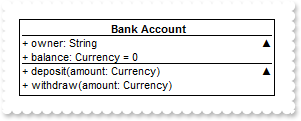
with thisform.SwimLane1
	var_s = "<solidline> <c><b>Bank Account</b></solidline><br>+ owner: String <r><a 1;e64=gA8ABzABvABsABpABkg8JABuABlAAgAA4AAwisXjMYH0TAECMY"
	var_s = var_s + "AjsCMwAM4AkMGhEGOUei0Yl8bkQAOAAlsGmsSlp0h0SgkCF8DgsNhUMhEKiESkYAoMlk8phssmcCltLMNTAFOlFDlc2l0amMxjomAAjAA5AA2tMaHcfplZk1blVDqtuo"
	var_s = var_s + "NXjoAAEBA=>▲</a><br><solidline>+ balance: Currency = 0</solidline><br>+ deposit(amount: Currency)<r><a 2;e64=gA8ABjAA+AECM"
	var_s = var_s + "wAM8DABvABshoAOQAEAAHAAGEWjEajMGNoAMoAOgANERMgAOcHAAvAEJhcEh0Qh0Tg0CmkqMMFlUuhkxiMTisXjNCjk6EwAEYAHIAG1MjY7lUsnkwh8/nUClk5gwAAEB"
	var_s = var_s + "A==>▲</a><br>+ withdraw(amount: Currency)"
	with .Elements.Add(var_s)
		.ID = "Account"
		.X = -128
		.CaptionSingleLine = 1
		.AutoSize = .F.
		.Width = 256
		.Height = .AutoHeight
		.CaptionAlign = 4 && 0x4
	endwith
endwith
|
|
105
|
Gets the width/height of the element to fit its content ( as if the AutoSize property is True )
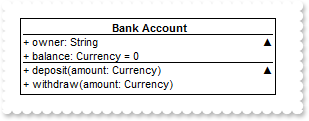
*** AnchorClick event - Occurs when an anchor element is clicked. ***
LPARAMETERS AnchorID, Options
	with thisform.SwimLane1
		with .Elements.Item("Account")
			.Height = .AutoHeight
		endwith
	endwith

with thisform.SwimLane1
	var_s = "<solidline> <c><b>Bank Account</b></solidline><br>+ owner: String <r><a 1;e64=gA8ABzABvABsABpABkg8JABuABlAAgAA4AAwisXjMYH0TAECMY"
	var_s = var_s + "AjsCMwAM4AkMGhEGOUei0Yl8bkQAOAAlsGmsSlp0h0SgkCF8DgsNhUMhEKiESkYAoMlk8phssmcCltLMNTAFOlFDlc2l0amMxjomAAjAA5AA2tMaHcfplZk1blVDqtuo"
	var_s = var_s + "NXjoAAEBA=>▲</a><br><solidline>+ balance: Currency = 0</solidline><br>+ deposit(amount: Currency)<r><a 2;e64=gA8ABjAA+AECM"
	var_s = var_s + "wAM8DABvABshoAOQAEAAHAAGEWjEajMGNoAMoAOgANERMgAOcHAAvAEJhcEh0Qh0Tg0CmkqMMFlUuhkxiMTisXjNCjk6EwAEYAHIAG1MjY7lUsnkwh8/nUClk5gwAAEB"
	var_s = var_s + "A==>▲</a><br>+ withdraw(amount: Currency)"
	with .Elements.Add(var_s)
		.ID = "Account"
		.X = -128
		.CaptionSingleLine = 1
		.AutoSize = .F.
		.Width = 256
		.Height = .AutoHeight
		.CaptionAlign = 4 && 0x4
	endwith
endwith
|
|
104
|
Fullfit the caption on the element's width
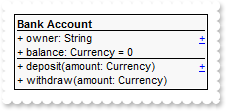
with thisform.SwimLane1
	var_s = "<solidline><b>Bank Account</b></solidline><br>+ owner: String <r><a 1;properties>+</a><br><solidline>+ balance: Currency = 0</so"
	var_s = var_s + "lidline><br>+ deposit(amount: Currency)<r><a 2;methods>+</a><br>+ withdraw(amount: Currency)"
	with .Elements.Add(var_s)
		.CaptionSingleLine = 1
		.BackColor = RGB(248,248,248)
		.AutoSize = .F.
		.Width = 194
		.Height = 76
		.CaptionAlign = 4 && 0x4
	endwith
endwith
|
|
103
|
Wrap the caption by <br> or "\r\n" sequence only
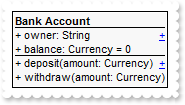
with thisform.SwimLane1
	var_s = "<solidline><b>Bank Account</b></solidline><br>+ owner: String <r><a 1;properties>+</a><br><solidline>+ balance: Currency = 0</so"
	var_s = var_s + "lidline><br>+ deposit(amount: Currency)<r><a 2;methods>+</a><br>+ withdraw(amount: Currency)"
	with .Elements.Add(var_s)
		.CaptionSingleLine = 1
		.BackColor = RGB(248,248,248)
	endwith
endwith
|
|
102
|
Display a custom tooltip
*** MouseMove event - Occurs when the user moves the mouse. ***
LPARAMETERS Button, Shift, X, Y
	with thisform.SwimLane1
		.ShowToolTip("new content","",Null,"+8","+8")
	endwith
|
|
101
|
Shows the tooltip of the object moved relative to its default position
*** MouseMove event - Occurs when the user moves the mouse. ***
LPARAMETERS Button, Shift, X, Y
	with thisform.SwimLane1
		.ShowToolTip("<null>","<null>",Null,"+8","+8")
	endwith

with thisform.SwimLane1
	.Elements.Add("Element with a Tooltip").ToolTip = "This is a bit of text that should be displayed when cursor hovers the element."
endwith
|